
 Knowledge Panel
Beyond the Software Shield: How Titan M2 Forges an Impenetrable Pixel 10
By Kashif Mukhtar, Security Specialist & Web Developer
In an era where our smartphones are digital extensions of ourselves – holding everything from our financial lives to our most intimate memories – the question of their security has never been more critical. Traditional software-based defenses, while essential, are increasingly challenged by sophisticated adversaries. This is where Google's Pixel series, particularly the upcoming Pixel 10, takes a decisive leap forward, thanks to its unsung hero: the Titan M2 security chip.
As a security professional and web developer, I've seen firsthand how vulnerabilities at the hardware level can undermine even the most robust software. The Titan M2 isn't just an incremental upgrade; it's a fundamental shift in mobile security philosophy, establishing a hardware root of trust that redefines what it means to secure a device.
The Titan M2: A Fortress on Silicon
Imagine a tiny, self-contained vault within your phone, completely separate from the main processor and its sprawling operating system. That's the Titan M2. Unlike a Trusted Execution Environment (TEE), which often shares resources with the main SoC, the Titan M2 is a discrete, purpose-built chip, designed and developed entirely in-house by Google.1 This isn't just a design choice; it's a strategic advantage. By controlling the silicon from the ground up, Google ensures unparalleled integration and the ability to rapidly respond to emerging threats.2
At its core, the Titan M2 runs on a RISC-V processor 1, an open-standard instruction set architecture that offers transparency and auditability. It boasts its own secure processor, hardware-accelerated cryptographic coprocessors (for AES and SHA operations), a true hardware random number generator (RNG) for robust key generation, and embedded memory (SRAM, flash, ROM).4 This isolation is key: a smaller, dedicated codebase running on its own hardware drastically reduces the attack surface compared to a full OS.4 It's like having a highly specialized, unbreachable safe deposit box for your most critical digital assets.

How Titan M2 chip sensitive operations independently to enhance the Pixel 10 phone's overall security.
Furthermore, each Titan M2 chip generates unique key material during manufacturing, certified and protected through air-gapped, multi-party controls.5 This "manufacturing identity" forms the bedrock of its hardware root of trust, aligning with industry standards like DICE and TPM.7 This isn't just about security; it's about verifiable trust, crucial for enterprise deployments and sensitive applications.
The Unbreakable Chain: Secure Boot, Reimagined
The moment you press the power button on your Pixel 10, the Titan M2 springs into action, becoming the hardware anchor for Android Verified Boot (AVB).5 But here's where it gets truly innovative: the Titan M2 physically interposes itself between the main Application Processor (AP) and the AP's boot firmware flash chip.5
Think of it as a vigilant gatekeeper. The Titan M2 holds the main processor in reset mode while it meticulously reads and cryptographically measures every single byte of the AP's boot firmware.7 Only after this rigorous, byte-by-byte verification is successful does the Titan M2 release the AP, allowing it to boot securely.5 This "man-in-the-middle" at the hardware level proactively prevents any unauthorized or tampered firmware from ever loading, effectively neutralizing sophisticated rootkits and persistent backdoors before they can even take hold.6

To further fortify this chain, the Titan M2 employs a Security Version Number (SVN) mechanism.5 Each firmware update comes with an incremented SVN, and the Titan M2 hardware enforces that only firmware with an SVN equal to or greater than the current version can load.7 This is a direct, hardware-level countermeasure against rollback attacks, ensuring that once a security patch is applied, your device cannot be downgraded to a vulnerable state, even if an attacker gains control of the update process.8
Fort Knox in Your Pocket: Data Protection & Key Management
For web developers, securing user data is paramount. The Titan M2 provides a robust foundation for this. It's instrumental in Android's full-disk and file-based encryption, securely storing decryption keys in its isolated memory, never exposing them to the main OS.4 Access to this encrypted data is strictly tied to user authentication (PIN, pattern, passcode).1
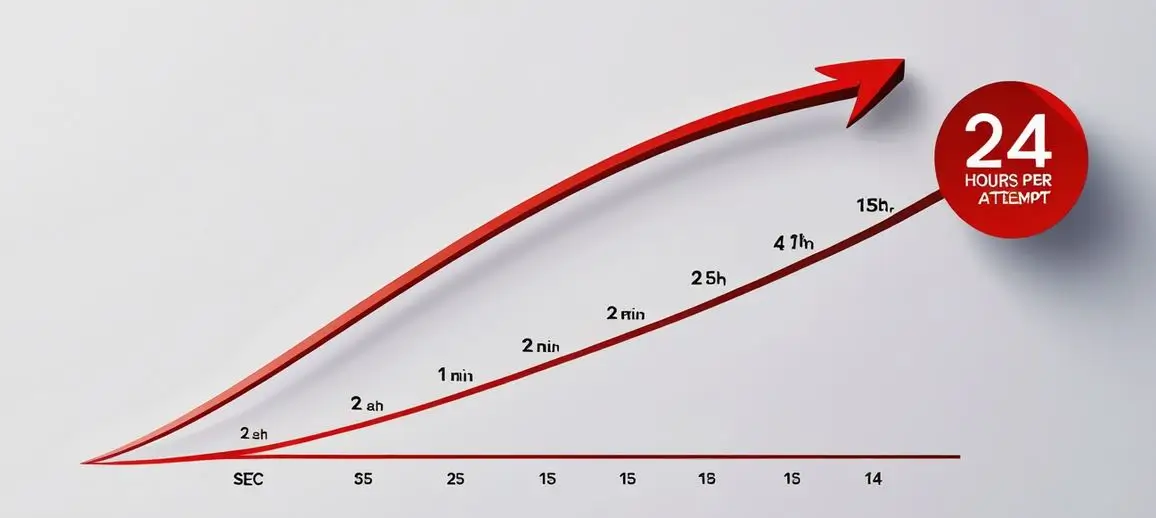
But what if an attacker tries to brute-force your lock screen? The Titan M2 has a hardware-enforced rate-limiting mechanism.1 After just 5 failed attempts, a 30-second delay is imposed. Beyond 139 attempts, the delay escalates to a full 24 hours per attempt.11 This isn't a software trick; it's a hardware-level throttle that makes brute-forcing practically impossible within any reasonable timeframe, safeguarding your data even if the device is physically compromised.11
The chip's cryptographic engine supports a comprehensive suite of NIST-validated algorithms, including various modes of AES, ECDSA, RSA, and SHA.12 This adherence to international standards ensures the strength, reliability, and auditability of its operations, a crucial detail for any security-conscious developer or organization.
Bridging Hardware and Software: The Developer's Edge
For web developers building secure applications, the Titan M2 isn't just an invisible guardian; it's an accessible tool. It plays a pivotal role in Android StrongBox, an API that allows third-party applications to generate, store, and use cryptographic keys directly within the Titan M2's isolated environment.15 This means sensitive key material for payment apps, password managers, or secure communication tools never leaves the secure chip, even if the main Android OS is compromised.9 This "hardware-backed keystore" significantly raises the security bar for sensitive app data.4
Beyond key management, Titan M2 supports Android Protected Confirmation.1 This feature provides high-assurance user intent verification for critical transactions. When a sensitive action is initiated (e.g., a payment), the system displays a prompt on a "Trusted User Interface." If the user explicitly confirms, a key within the Titan M2 cryptographically signs the message.17 This signature offers verifiable proof that the user saw and agreed to the specific action, making it incredibly difficult for malware or remote attackers to trick users into authorizing malicious operations.17 It's a powerful defense against social engineering.
Finally, the Titan M2 is a cornerstone of Google's FIDO (Fast Identity Online) authentication standards, including FIDO2 and WebAuthn.4 This allows Pixel phones to act as highly secure, hardware-backed authenticators for online accounts, paving the way for a truly passwordless future.20 The private key is generated and stored exclusively within the tamper-resistant Titan M2, never leaving the device.20 This cryptographic binding makes phishing attacks virtually impossible, as the authentication is tied to the legitimate service's URL.20

Beyond the Horizon: What This Means for Mobile Security
The Pixel 10's security architecture, powered by the Titan M2 and its synergistic relationship with the Google Tensor Security Core 15, represents a distributed, multi-layered hardware security model. This approach compartmentalizes risk, ensuring that even if one component faces a challenge, others remain isolated and functional.15
For security specialists, this translates to a higher baseline of resistance against physical and side-channel attacks, and a significantly reduced attack surface for zero-day exploits.6 For web developers, it means a more trustworthy platform to build applications that handle sensitive user data, leveraging hardware-backed APIs for robust key management and user consent.
The Titan M2 isn't just securing the Pixel 10; it's setting a new standard for mobile device security, pushing the industry towards a future where hardware-rooted trust is not just a feature, but a fundamental expectation. As our digital lives become increasingly intertwined with our mobile devices, understanding and leveraging these deep-seated security innovations will be paramount for both users and developers alike.
Google Titan M2 vs. Samsung Knox
An in-depth comparison of two leading mobile security solutions. The key difference? Titan M2 is a specialized security chip, while Knox is an all-encompassing security platform.
Hardware-to-Hardware: Titan M2 vs. Knox Vault
The most direct technical comparison is between Google's security chip and Samsung's equivalent. Both are secure subsystems (also called a "secure enclave" or "secure element") that are physically isolated from the main Application Processor (AP) where Android runs. Their job is to handle the most sensitive data (like your PIN, passwords, and cryptographic keys) in a "black box" that the main OS cannot touch, even if the OS itself is compromised.
| Feature | Google Titan M2 | Samsung Knox Vault |
|---|---|---|
| Component Type | A discrete, custom-designed secure microcontroller chip. | An isolated, tamper-proof secure subsystem with its own processor, memory, and storage. |
| Architecture | Based on the RISC-V instruction set. It includes its own CPU, hardware random number generator (RNG), crypto accelerators, and internal flash/SRAM. | Based on a secure ARM processor. It is also a self-contained system with its own secure memory and dedicated storage. |
| Primary Function |
|
|
| Security Certifications |
|
|
Platform-Level: Google's Security vs. Samsung's Knox Platform
This is where the difference in philosophy becomes clear. Google focuses on hardening the core Android platform, while Samsung builds a comprehensive, feature-rich security *suite* on top of it, with a heavy emphasis on enterprise needs.
Google: The "Titan Platform" (Pixel Phones)
Google's security is a multi-layered hardware defense. The Titan M2 chip is the anchor, but it works with other components:
- Titan M2: The dedicated secure chip (as described above).
- Tensor Security Core: A custom security-focused processor core *within* the main Tensor SoC. It handles security-critical tasks that are less sensitive than what the M2 handles, but still too sensitive for the main CPU.
- Trusty TEE (Trusted Execution Environment): A standard ARM TrustZone-based isolated environment that runs a separate, secure OS (called "Trusty") for handling secure operations.
- Core Android Security: All the standard Android features like verified boot, file-based encryption, and Google Play Protect, all running in their cleanest, most up-to-date form.
User-Facing Features: For Google, the security is mostly invisible. It's designed to make the *entire device* fundamentally more secure, rather than giving you a separate "box" to put things in.
Samsung: The "Knox Platform"
Samsung's Knox platform is an end-to-end solution that starts at the chip and extends all the way to cloud management tools for IT admins.
- Hardware Foundation: Includes the Knox Vault (on flagship devices) and leveraging ARM TrustZone (on all Knox devices) for a hardware-backed TEE.
- Real-time Kernel Protection (RKP): Constantly monitors the Android kernel (the OS core) to prevent and block any unauthorized modifications (like from a root exploit) while the phone is running.
- Secure Boot: Ensures that only Samsung-signed, unmodified software can be loaded when the phone starts up.
- Secure Folder: This is the most famous user-facing feature. It's an encrypted, isolated "sandbox" on your phone where you can install separate copies of apps and store files. It's like having a second, private phone hidden inside your main one, protected by the Knox hardware.
- Knox Suite (Enterprise): This is what truly sets Knox apart. It's a massive suite of cloud-based tools for businesses to:
- Deploy & Manage: Remotely set up, configure, and manage thousands of corporate devices.
- Control Updates: Manage when and if devices receive OS updates (Knox E-FOTA).
- Device Attestation: Remotely verify that a device hasn't been tampered with or compromised before allowing it to access corporate data.
Summary: Which is "Better"?
There is no "better" solution; they have different goals.
Choose Google's Titan M2 (Pixel) if...
You are a security-conscious individual who prioritizes core platform integrity, the fastest security updates, and a "clean" Android experience. You trust the security to be deeply integrated and invisible, protecting the entire system automatically. It is also the platform of choice for alternative privacy-focused OSes like GrapheneOS, which speaks to the quality of its underlying hardware security.
Choose Samsung's Knox Platform if...
You are an enterprise user or a power user who wants explicit, user-facing security features. You need to separate your "work" and "personal" lives on one device (via Secure Folder), or your organization needs to manage a fleet of devices with defense-grade, certified security and powerful remote management tools.