
 Knowledge Panel
Executive Summary
Google has officially announced the rollout of Gemini 3, positioning it not just as a text-generation update, but as a foundational shift toward “state-of-the-art reasoning” and agentic workflows. This release is less about chatting with a bot and more about enabling developers to build complex, multi-step autonomous systems.
The ecosystem is expanding significantly with the introduction of Google Antigravity (a new IDE/Platform), major updates to Google AI Studio, and a robust Gemini CLI. Below is a deep dive into the architecture, features, and a critical analysis of the launch.
1. The Core Model: Gemini 3 Pro
The centerpiece of this release is the Gemini 3 Pro model. Google is making aggressive claims regarding its performance relative to the previous 2.5 architecture.
- Reasoning Over Retrieval: The announcement emphasizes “state-of-the-art reasoning.” This suggests a move away from simple pattern matching toward logic-heavy processing, crucial for complex debugging or architectural planning.
- Coding Dominance: It is explicitly stated to surpass Gemini 2.5 Pro in coding tasks. The specific focus here is on agentic workflows and complex zero-shot tasks. This implies the model can handle a prompt like “Build a snake game” (zero-shot) or “Refactor this repository” (agentic) with higher success rates than its predecessor.
- Availability: Developers can access this immediately via the API using the model string
gemini-3-pro-preview.
2. The Developer Ecosystem Updates
Google is fragmenting its developer surface into three distinct tiers to handle different use cases:
A. Google AI Studio (The Prototyping Layer)
Target: Rapid prototypers and app builders.
- Build Mode: This is a significant UX upgrade. It features “auto wiring,” which automatically connects the right models and APIs.
- Annotations: Designed for fast iteration, likely allowing developers to “mark up” model responses to steer behavior.
B. Google Antigravity (The Agentic IDE)
Target: Serious software engineers and agent developers.
- Concept: This is an “agentic development platform” that retains the feel of a familiar AI IDE but operates at a “task-oriented level.”
- Function: It manages agents across workspaces. This suggests a shift from writing code line-by-line to managing autonomous agents that write the code for you.
- OS Support: Available in public preview for MacOS, Windows, and Linux.
C. Gemini CLI (The Orchestration Layer)
Target: DevOps, Power Users, and System Architects.
- Tool Use: Leverages Gemini 3 to orchestrate tasks across APIs, MCP (Model Context Protocol) servers, and extensions.
- Context Awareness: Can hook into observability and security tools, effectively allowing the CLI to “manage” your infrastructure.
3. Critical Analysis: The Positives
Based on the announcement, the Gemini 3 ecosystem offers several “Pro-grade” advantages:
- Zero-Cost Entry for Antigravity: The public preview of Google Antigravity is available at “no charge.” For a new IDE platform competing with tools like Cursor or Windsurf, a free entry point is a massive adoption driver.
- True Agentic Native Support: By explicitly mentioning “MCP servers” (Model Context Protocol) and “agentic workflows,” Google is acknowledging that the future of AI is systems acting on behalf of users, not just answering questions.
- Unified “Build Mode”: The reduction of friction in Google AI Studio (auto-wiring APIs) addresses a major pain point: the “blank page” problem when starting a new AI integration.
- Immediate Access: Unlike some “waitlist-only” launches, the
gemini-3-pro-previewstring is live for API usage immediately.
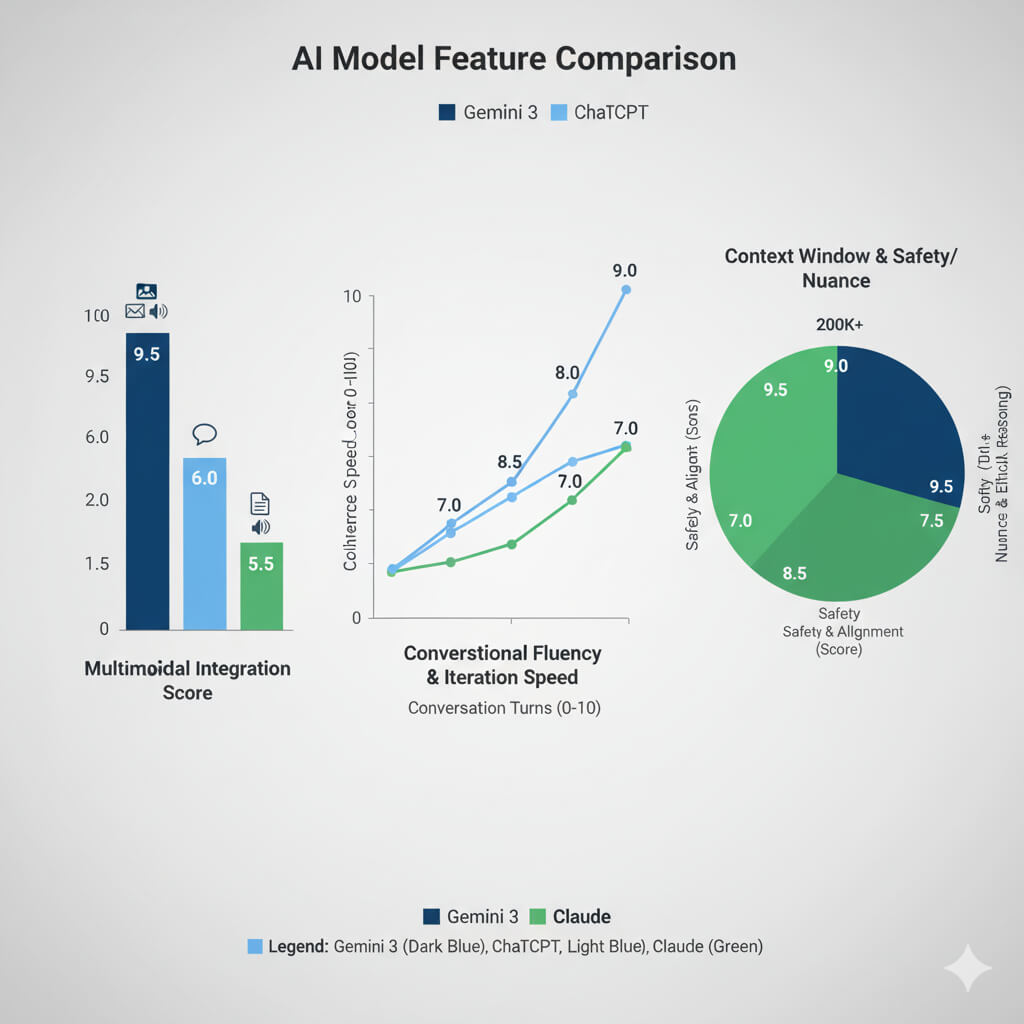
This set of graphs provides a conceptual comparison of three AI models: Gemini 3 (hypothetical), ChatGPT, and Claude, across key features. The bar chart on the left highlights **Multimodal Integration**, where Gemini 3 (dark blue) shows superior integration across various data types compared to ChatGPT (light blue) and Claude (green). The middle line graph, showing **Conversational Fluency & Iteration Speed**, illustrates that ChatGPT (light blue) generally offers a quicker and more fluid conversational experience over multiple turns compared to Claude (green). Finally, the radar chart on the right, for **Context Window & Safety/Nuance**, indicates Claude’s (green segments) strong performance in both a large context window (200K+) and a high safety and ethical alignment score, while Gemini 3 (dark blue) also shows strong safety, and ChatGPT (light blue) holds a good balance.
4. Critical Analysis: The Negatives & Limitations
Despite the strong feature set, a close reading of the release reveals several drawbacks and friction points:
- The “Ultra” Paywall for CLI: Perhaps the biggest negative is that Gemini 3 in the CLI is gated behind the “Google AI Ultra” subscription. This effectively puts command-line orchestration out of reach for casual developers or those on standard tiers.
- Enterprise Features are “Roadmapped”: The announcement notes that “Google AI Ultra for Business is on the roadmap.” This indicates that enterprise-grade security, billing, or management features for the CLI are not currently ready, which may stall corporate adoption.
- Preview Instability: The heavy use of the word “Preview” (Gemini 3 Pro Preview, Antigravity Public Preview) signals that these tools are likely essentially betas. Developers should expect breaking changes, API instability, or performance quirks in production environments.
- Ecosystem Complexity: With the introduction of Antigravity alongside AI Studio and Gemini CLI, the “happy path” for a developer is becoming complex. Knowing which tool to use for which stage of development (Prototyping vs. Engineering vs. Orchestration) may require a steep learning curve.
Final Verdict
Gemini 3 represents a maturation of Google’s AI strategy. It moves beyond the “chatbot wars” into the “agentic infrastructure wars.” The Antigravity IDE is the most exciting development for pure coding, while the Gemini 3 Pro model promises the reasoning capabilities required to make that IDE useful. However, the decision to paywall the CLI capabilities behind an “Ultra” subscription may alienate the open-source and hobbyist developer community.
Gemini 3 Pro is Google's latest AI model built on state-of-the-art reasoning capabilities. Unlike previous iterations, it is architected to prioritize logic over simple information retrieval, making it exceptionally powerful for coding and complex problem-solving.
While Gemini 2.5 was a significant step forward, Gemini 3 Pro is explicitly designed to master agentic workflows and complex zero-shot tasks. It moves beyond generating text to "reasoning" through multi-step problems, delivering far superior results in coding and architectural planning.
Google Antigravity is a new agentic development platform (IDE) that enables developers to operate at a higher, task-oriented level. It allows you to manage AI agents across workspaces while retaining the familiar feel of a standard code editor.
Agentic workflows refer to AI systems that can autonomously perform multi-step tasks to achieve a goal, rather than just answering a single prompt. In Gemini 3, this means the model can plan, execute, debug, and refine code across different files without constant user hand-holding.
Developers can access the model immediately via the Gemini API using the model string gemini-3-pro-preview. It is also available inside Google AI Studio by selecting "Gemini 3 Pro Preview" from the model dropdown.
Build Mode is a new feature in Google AI Studio designed to accelerate prototyping. It uses AI to "auto-wire" the correct models and API connections for your specific idea, significantly reducing the friction of setting up a new AI application.
Yes, currently. The public preview of Google Antigravity is available at no charge for MacOS, Windows, and Linux users. However, pricing models may change as the product moves out of preview.
Yes. Accessing Gemini 3's advanced orchestration features via the Gemini CLI currently requires a Google AI Ultra subscription. Enterprise-grade features (Google AI Ultra for Business) are currently on the roadmap.