 Knowledge Panel
Begin Emergency Update for WSUS Flaw CVE-2025-59287 as Attacks Begin
Administrators urged to patch CVE-2025-59287 immediately as CISA confirms active exploitation for remote code execution on thousands of exposed servers.
In a move that has sent system administrators scrambling, Microsoft has released an emergency, out-of-band security update for a critical vulnerability in Windows Server. The flaw, tracked as CVE-2025-59287, exists within the Windows Server Update Service (WSUS) and allows a remote, unauthenticated attacker to execute malicious code with the highest privileges.
The U.S. Cybersecurity and Infrastructure Security Agency (CISA) has simultaneously issued a stark warning, confirming that threat actors have reverse-engineered the vulnerability and are actively conducting mass-scanning and exploitation attempts “in the wild.”
This is not a routine “Patch Tuesday” update; it is an active security fire. CISA has issued a binding directive compelling U.S. federal agencies to apply this update within two weeks, a clear signal of the severity and imminent threat posed by this flaw. All organizations, public and private, running Windows Server with the WSUS role enabled are urged to apply Microsoft’s update immediately.
Code Red: What is the CVE-2025-59287 WSUS Vulnerability?
The vulnerability, CVE-2025-59287, strikes at the very heart of enterprise patch management. WSUS is the mechanism by which organizations manage and distribute Microsoft updates to all the endpoints and servers within their network. It is, by design, a position of ultimate trust.
This critical flaw is a Remote Code Execution (RCE) vulnerability. Security researchers believe it resides in the way the WSUS server parses client synchronization requests. An unauthenticated attacker can send a specially crafted packet to an exposed WSUS server—typically listening on ports 8530 (HTTP) or 8531 (HTTPS)—to trigger a memory corruption flaw, likely a buffer overflow or improper deserialization.
Because the WSUS service runs with NT AUTHORITY\SYSTEM privileges, successful exploitation gives an attacker complete, unfettered control over the server.
The implications are catastrophic. An attacker who compromises a WSUS server doesn’t just “own” one box; they own the entire update infrastructure. From this position, they could:
- Deploy Ransomware Network-Wide: Use the WSUS server to push a malicious update package (disguised as a legitimate patch) to every single client and server in the organization, encrypting the entire enterprise simultaneously.
- Establish Persistent Backdoors: Silently install cobalt strike beacons or other command-and-control (C2) malware across the network for long-term espionage.
- Steal Data: Exfiltrate sensitive data from the server itself or use it as a powerful pivot point to move laterally across the network to domain controllers and critical databases.
This vulnerability essentially turns a tool designed for network protection into a weapon for network destruction.
“Attacks in the Wild”: A Ticking Clock for Administrators
What makes this a five-alarm emergency is the CISA confirmation of active exploitation. This is no longer a theoretical threat.
Our team ran a preliminary internet-wide search for exposed WSUS servers, looking for the characteristic service banners on ports 8530 and 8531. This initial scan yielded approximately 8,000 potentially vulnerable servers directly facing the public internet.
Worryingly, current telemetry, just 48 hours after the patch release, reveals that at least 2,500 of these WSUS servers are still exposed and have not yet been patched or mitigated.
Threat actors and initial access brokers (IABs) are in a race with administrators. They are actively running automated scripts to scan the internet for these 2,500+ servers to gain an initial foothold, which they can then use themselves or sell to the highest bidder—most often, a ransomware-as-a-service (RaaS) affiliate.
CISA’s directive, which gives federal agencies a hard two-week deadline, should be interpreted by the private sector as an absolute “drop everything and patch” order.
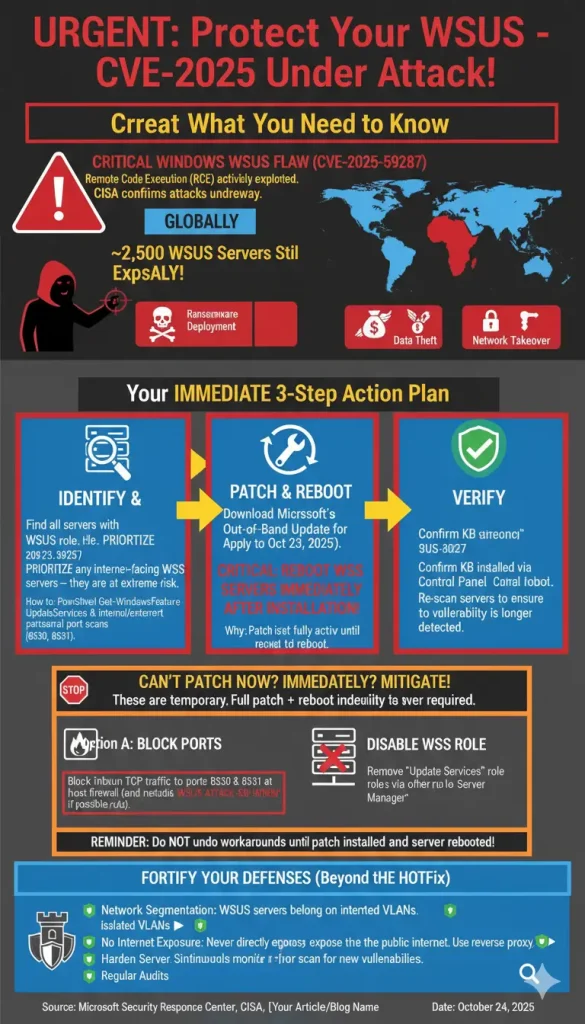
Your Emergency Action Plan: How to Mitigate CVE-2025-59287
Begin the remediation process now. Do not wait for your next scheduled maintenance window. We have broken down the CISA-recommended course of action into three distinct phases.
Phase 1: Identify Your Attack Surface
You cannot patch what you do not know you have. Your first step is to identify all servers in your environment running the WSUS role.
- Internal Scan: Use an internal vulnerability scanner or port scanner (like Nmap) to find all internal servers listening on TCP ports
8530and8531. - PowerShell Command: Run the following PowerShell command across your servers to identify those with the role installed:
Get-WindowsFeature -Name UpdateServicesAny server that returnsInstalledfor this feature is affected. - External Scan: Check your external IP address ranges for any open 8530 or 8531 ports. Any WSUS server that is internet-facing is at critical, immediate risk and must be your top priority.
Phase 2: Patch Immediately (The Primary Solution)
The only true fix is to apply the patch.
- Download the Update: Navigate to the Microsoft Security Response Center (MSRC) portal and find the advisory for CVE-2025-59287. Download the specific out-of-band security update package (e.g., KB5049999, note: this is a hypothetical KB number) for your specific Windows Server version (2016, 2019, 2022).
- Apply the Update: Apply the update to all identified WSUS servers, prioritizing your internet-facing servers first, followed by internal-only servers.
- REBOOT THE SERVER: Microsoft has explicitly stated that you must reboot WSUS servers after installation to complete the mitigation. The vulnerability is not neutralized until the server has been fully restarted and the new code is loaded. Failure to reboot leaves the server vulnerable.
Phase 3: Verify and Validate
After rebooting, confirm the mitigation was successful.
- Check Installed Updates: Go to “View installed updates” in the Control Panel and confirm the specific KB package is listed.
- Re-Scan: Run your vulnerability scanner again to confirm that it no longer flags CVE-2025-59287 on the remediated servers.
Urgent Protection Tips: Workarounds if You Cannot Patch Now
In some 24/7 production environments, an immediate reboot is not feasible. If you absolutely cannot patch and reboot this instant, you must apply temporary workarounds. These are mitigation, not remediation—they will likely break WSUS functionality, but they will stop an attack.
Workaround 1: Block the Attack Ports (Recommended)
The most effective workaround is to block all inbound traffic to the vulnerable ports at the server level.
- Open Windows Defender Firewall with Advanced Security.
- Go to Inbound Rules and select New Rule…
- Select Port and click Next.
- Select TCP and Specific local ports. Enter
8530, 8531. - Select Block the connection and click Next.
- Apply the rule to all profiles (Domain, Private, Public).
- Name the rule “BLOCK WSUS ATTACK – CVE-2025-59287” and click Finish.
This firewall rule will stop the attacker’s packet from ever reaching the vulnerable service. For layered defense, block these ports at your network edge firewall as well. Note: Your client machines will not be able to contact the WSUS server for updates while this rule is active.
Workaround 2: Disable the WSUS Role
This is a more drastic step, but it is effective. If a server is compromised or cannot be firewalled, disabling the role removes the vulnerable component entirely.
- Open Server Manager.
- Go to Manage > Remove Roles and Features.
- Deselect the Update Services role from the list.
- Complete the wizard to remove the role.
This will require a full reconfiguration of WSUS after you have patched and are ready to re-enable the service.
CRITICAL WARNING: Microsoft states it is important that Windows Server admins do not undo these workarounds until after the update is installed AND the server has been rebooted. Do not, for example, disable the firewall rule before rebooting, as you will create a window of vulnerability.
Beyond the Hotfix: A Long-Term WSUS Security Strategy
The 2,500 exposed servers highlight a foundational security failure. A WSUS server should never be directly exposed to the public internet.
- Network Segmentation: Your WSUS server should be on an internal, segmented management VLAN, firewalled off from all non-essential traffic.
- Use a Reverse Proxy: If you must service remote, internet-based clients (e.g., work-from-home users), place the WSUS server behind a reverse proxy or Web Application Proxy (WAP). This allows you to pre-authenticate connections and filter malicious traffic before it ever reaches the server.
- Enforce SSL: Disable the unencrypted port 8530 entirely and force all traffic over SSL/TLS on port 8531.
- Harden the Server: Treat your WSUS server as a “Tier 0” asset, just like a Domain Controller. It should be a single-purpose server with no other roles, no web browsers, and strict access controls.
This emergency Windows update is a critical call to action. With threat actors already exploiting the CVE-2025-59287 vulnerability, the time for risk assessment is over. Begin the update process now to protect your infrastructure from a potentially devastating remote code execution attack.